

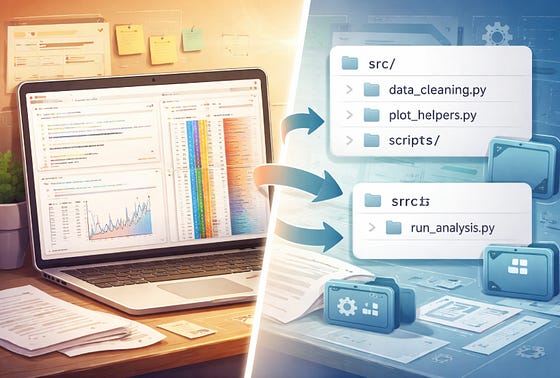
Jupyter Notebooks stick around longer than they should.
That’s not really a criticism of the format. It’s a consequence of how well notebooks work at the start.
A notebook that started as a forty-cell exploration of some well log data becomes the thing everyone references, then the thing someone tries to run in a pipeline, then the thing nobody can quite reproduce reliably. It doesn’t go wrong suddenly. It drifts over time.
The problem isn’t that notebooks are bad tools. They’re excellent tools for a specific class of work: exploration, communication, teaching, one-off analysis where the narrative matters as much as the code.
The issue is that the same properties that make them good at that work can make them awkward for almost everything else.
What Notebooks Are Actually Good For
The cell structure, mixed with explanations and inline outputs, is designed to make it easy to tell a story about a dataset or an analysis, to show your working, and to let someone else follow your reasoning.
That’s genuinely useful. If you’re exploring an unfamiliar dataset, a notebook lets you try things, see results immediately, and build up a picture incrementally. If you’re presenting findings, a notebook can serve as a written record of an analysis. If you’re teaching, the step-by-step format provides a great tool for anyone trying to replicate what you did.
All of those use cases have something in common.
They’re all modes where the notebook itself is the deliverable, or where the exploratory, document-like format is an asset rather than a liability. The code and the narrative belong together. You want someone to read both.
The Signals That It’s Time to Move
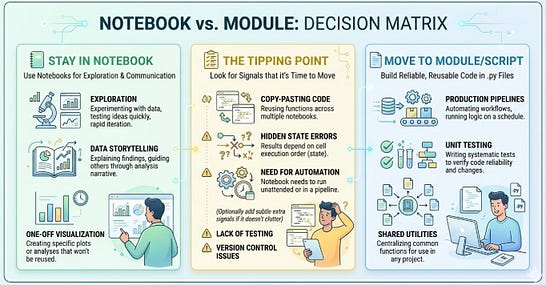
Most notebooks do not stay in the exploratory phase forever. At some point the analysis produces something useful: a data-cleaning function, a plotting helper, a QC routine. Then you, or someone else, wants to reuse it somewhere else. That is usually where the cracks begin to appear.
Here are some of the clearest signs that it is time to move logic out of the notebook and into modules or scripts.
Copying and pasting. If you find yourself copying a function from one notebook into another, you’ve already identified something that should be a module.
Keeping it in a notebook means every change needs to be replicated wherever you’ve copied it. That’s not a minor inconvenience. It’s how subtle inconsistencies creep in and how debugging becomes genuinely painful: you fix a bug in one place and it persists in three others you’ve forgotten about.
A common example is a data-loading or QC helper that starts life in one notebook cell because you only need it once. Then it gets copied into a second notebook, then a third, with small changes each time. Before long, you no longer have one version of the logic. You have several near-identical versions, each with slightly different assumptions, and none of them feels safe to change.
Execution order. Notebooks run in whatever order you choose. That flexibility is useful while exploring, but it means a notebook’s state at any given moment depends on its history.
Hidden state, variables that exist because of cells you ran earlier, or cells you deleted and re-ran, can produce results that look correct in the moment and break unpredictably later. If you’ve ever handed someone a notebook that works fine on your machine and had to say “make sure you run cell 4 before cell 7,” you’ve felt this problem. It doesn’t get easier as the notebook grows.
Testing. If a function matters enough that you want to verify it still works after a change, it usually belongs in a .py file where a test suite can reach it directly. You can test notebooks to a degree, but logic buried inside notebook cells is much harder to test systematically, review cleanly, and maintain over time.
Deployment. If the notebook is meant to run on a schedule, as part of a pipeline, or triggered by some external process rather than being opened and run manually by a human, you’re already in script territory.
Tools do exist to execute notebooks headlessly, and sometimes that’s the right call for a quick automation. But more often it’s a signal that the notebook format is being asked to do something it wasn’t designed for, and that friction tends to compound.
If the signals here feel familiar, the follow-up question is usually where the extracted logic should actually go. I’ve written a piece on Substack about the folder structure that makes this a straightforward decision on every project. Link at the end.
What Modules and Scripts Give You
Moving logic into modules and scripts doesn’t mean abandoning notebooks. It means separating two things that are better kept apart: the logic, and the narrative.
A module is a .py file that collects functions, classes, or constants. Once something lives there, any notebook in the project can import it. Change the function once, and every notebook that uses it gets the update. You can write tests against it. You can version-control it cleanly. You can read it in any text editor and immediately see the complete definition of a function without running anything first.
A script is a .py file designed to be run from the command line or triggered by a scheduler. It’s the right tool when the work is execution rather than exploration: clean this dataset, generate this set of figures, produce this output file. It has no hidden state, no cells to run in the wrong order, no reliance on a kernel that’s been running since Tuesday.
The combination isn’t complicated. Notebooks do exploration and communication. Modules hold reusable logic. Scripts handle execution. Each one does the job it’s actually suited to.
What you don’t want is a notebook that has quietly become the only place certain critical logic lives, that can only be run by opening it in a browser and clicking Run All, and that nobody is entirely sure produces the same results as it did six months ago. That situation is more common than it sounds.
Making the Move
The goal is not to empty the notebook. It is to leave in place the part notebooks are genuinely good at: exploration, comparison, interpretation, and recording decisions.
A better notebook is not one that does everything. It is one that keeps the thinking visible and moves the machinery elsewhere.
The practical question is when to do this. The answer is not “always from the start”. That tends to make early exploration cumbersome and over-engineer work that might be thrown away after two hours. Not every function you write in a notebook deserves promotion into the wider project. Some code is just scaffolding for thinking, and that is fine.
It is also not “never until everything breaks”.
A workable rule of thumb is simple: if you have used a piece of logic in more than one place, extract it. If it needs to run without a human at the keyboard, make it a script. If it matters enough to test, it belongs in a module.
The goal is not to eliminate notebooks. It is to separate narrative, reusable logic, and execution so each part lives in the right place.
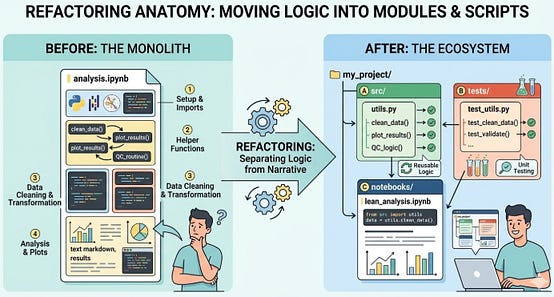
The refactor is usually simpler than it feels. You move a function out of a notebook cell and into a .py file in your project’s src/ directory, then import it wherever you need it. The notebook becomes simpler. The logic becomes portable and testable. The project becomes easier to hand over.
What a Better Structure Looks Like
One reason notebook-heavy projects become messy is that there is often no obvious destination for the logic once it outgrows the notebook. Functions stay where they were first written because there is nowhere else that feels natural. That is where a simple project structure helps.
You do not need anything elaborate. You just need clear separation: notebooks for exploration and explanation, a src/ directory for reusable logic, a data/ area that distinguishes raw inputs from processed outputs, and a consistent place for figures and reports. Once those boundaries exist, the refactor becomes much easier because the question is no longer whether something should move, but where it belongs.
A structure like this will not do the refactoring for you, but it removes a lot of hesitation. The notebook can stay focused on the analysis itself, while the logic that needs to be reused, tested, or run elsewhere has a proper home.
project_name/
├── notebooks/
│   ├── 01_exploration.ipynb       # scratch pad
│   ├── 02_analysis.ipynb          # clean story
│   └── archive/                   # old versions
├── src/
│   ├── __init__.py
│   ├── config.py                  # all paths
│   ├── data_loaders.py            # reusable loaders
│   └── plotting.py                # plot styling and saving
├── data/
│   ├── raw/                       # never modify these
│   └── processed/                 # outputs from notebooks
├── outputs/
│   └── figures/
├── .gitignore
├── requirements.txt
├── CHANGELOG.md
└── README.md
The project structure article in this series covered this setup in more detail: a src/ directory with an __init__.py, a consistent place for reusable helpers, and notebooks that stay lean because the heavy lifting happens in importable code. The structure will not do the refactoring for you, but it removes the question of where things should go when you do.
The Cost of Waiting
Notebooks don’t become the wrong tool through any single decision. It usually happens through gradual accumulation: one more function added to an already cluttered cell, one more place where the same logic gets copied, one more attempt to turn a piece of exploratory analysis into a repeatable process. The format accommodates all of it until, at some point, it doesn’t.
If you recognise the signals early: copy-paste, execution-order fragility, the need for testing, the need for deployment, the move is usually manageable.
Wait long enough and you’re not refactoring a notebook. You’re untangling a system.
Knowing when to move logic out of a notebook is one thing. Having a project structure that makes it obvious where it should go is another. On Substack I’ve written a guide to the folder layout, config.py pattern, and reusable src/ modules that turn this from a judgement call into a habit -- including a Cookiecutter template that generates the whole setup in a single command.
→ The Project Structure That Makes Good Notebook Habits Automatic