


When writing Python code, it is very easy to add print() statements through your code to help debug it. However, doing this isn’t the most efficient way. It can lead to cluttered code and confusing output (especially if you are just printing the variable values with no context).
Admittedly, I still use the print() when quickly debugging small pieces of code, however, I have found that as my code grows it can start to become a chore to maintain the print statements.
This is why I went in search for some alternatives and I found icecream and snoop.
Both are lightweight libraries that greatly improve the debugging process by making it easier and more readable without needing to setup a logger or the debugger.
In this article, we will go over these two libraries with some real world examples that I have encountered when writing code for petrophysical applications.
icecream
icecream is a small Python library that helps you debug your code by outputting the expression you used and its corresponding value. This can sometimes get lost when you use basic print statements.
For example
x = 42
print(x)
And what we will get back is:
42When we use icecream, we will get back a little extra info:
ic| x:42If we were to do the above with a print statement, we would need to include the variable name manually.
To get started with icecream, you can install it through pip as follows:
pip install icecreamOnce installed, we can start using it by wrapping variables in ic() and view the output.
The following example shows how we can apply icecream to a very simple petrophysics cutoff equation.
from icecream import ic

gr = 65  # Gamma Ray API
vsh_cutoff = 75
phi = 0.18
sw = 0.42

ic(gr < vsh_cutoff)     # Is this clean sand?
ic(phi)
ic(sw)
net_pay_flag = (gr < vsh_cutoff) and (phi > 0.15) and (sw < 0.6)

ic(net_pay_flag)
When we run the above code, we get the following output, which is nicely formatted with colouring and the actual variable name. This makes it faster to read.
ic| gr < vsh_cutoff: True
ic| phi: 0.18
ic| sw: 0.42
ic| net_pay_flag: True
If we had just used print statements, we would get the output below.
True
0.18
0.42
True
This is less readable, and you have to try and work out what line of code each print statement comes from.
It may be fine to use print in the moment, but once you have several print statements, it starts to become a headache trying to figure out what each output refers to.
Other use cases for icecream, include:
Using it inside expressions
result = ic(len("sandstone")) + ic(len("shale"))Which results in:
ic| phi_core: 0.22, correction: 0.05Inspecting Function Arguments and Return Values
When trying to debug a function, we can use icecream to see what argument values were passed in, as well as what the function is returning.
In the example below, the phi_core and correction parameters have been wrapped by icecream, as well as the result.
from icecream import ic

def calculate_porosity(phi_core, correction=0.05):
    ic(phi_core, correction)
    return ic(phi_core + correction)

calculate_porosity(0.22)
When we run the above, we get the following output. This shows the variable names alongside the values.
ic| phi_core: 0.22, correction: 0.05
ic| phi_core + correction: 0.27Debugging Inside List Comprehensions
List comprehensions can be confusing, especially for new python programmers. It can sometimes be difficult to see what is happening inside the comprehension.
By using icecream, we can wrap parts of it up and view the output as it is being processed.
logs = ["GR", "NPHI", "RHOB", "DT"]
log_lengths = [ic(len(log)) for log in logs]
Which outputs the following:
ic| len(log): 2
ic| len(log): 4
ic| len(log): 4
ic| len(log): 2
A more complex list comprehension:
raw_rhob = [2.65, 2.9, 3.2, 1.2, 2.45, 2.75]
correction = -0.05

corrected = [
    round(ic(val + correction), 2)
    for val in raw_rhob
    if ic(1.5 <= val <= 3.0)
]
When using icecream, it will give us some info as to what is happening within the list comprehension. We will also be able to trace which values are being rounded correctly within this process, as well as seeing what values get filtered out.
ic| 1.5 <= val <= 3.0: True
ic| val + correction: 2.6
ic| 1.5 <= val <= 3.0: True
ic| val + correction: 2.85
ic| 1.5 <= val <= 3.0: False
ic| 1.5 <= val <= 3.0: False
ic| 1.5 <= val <= 3.0: True
ic| val + correction: 2.4000000000000004
ic| 1.5 <= val <= 3.0: True
ic| val + correction: 2.7
This is great for small lists, but could get cumbersome as the data grows.
More examples can be found on the icecream GitHub repo: GitHub — gruns/icecream: 🍦 Never use print() to debug again.
snoop: See Your Code Run Line by Line
If you thought icecream was a step up from the print statement, then snoop takes things to a whole new level!
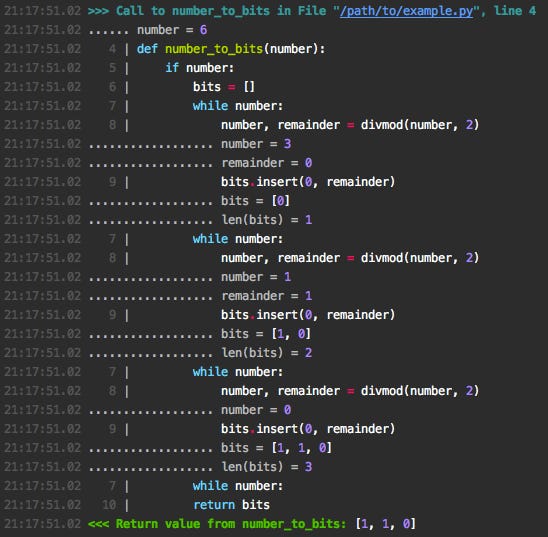
snoop is a lightweight library that logs every line of a function as it is run, alongside any variable changes that occur. And it also include its own version of icecream.
To install snoop, you can use the following line in your terminal:
pip install snoopIn order to use snoop on a function, all we have to do is import the library and then apply the @snoop decorator to the function. once we have done that we can run the code.
The execution of the function will appear to slow down, but you will end up with richer output.
For example, if we take the simple function below that calculates a volume based on thickness and area:
import snoop

@snoop
def calculate_volume(thickness, area):
    net = thickness * 0.8
    volume = net * area
    return volume

calculate_volume(12, 1500)
We get back the following output in the terminal:
07:08:07.43 ...... thickness = 12
07:08:07.43 ...... area = 1500
07:08:07.43    4 | def calculate_volume(thickness, area):
07:08:07.43    5 |     net = thickness * 0.8
07:08:07.43 .......... net = 9.600000000000001
07:08:07.43    6 |     volume = net * area
07:08:07.43 .......... volume = 14400.000000000002
07:08:07.43    7 |     return volume
07:08:07.43 <<< Return value from calculate_volume: 14400.000000000002
From this we can see when each line was run, what that line did, and any intermediate and return values that were calculated.
And we didn’t have to add a single print statement to the function. So rather than removing several print statements, we can just remove the decorator.
If we look at a more complex example:
import snoop

@snoop
def flag_sand_shale(gr_values, cutoff=75):
    clean_flags = []
    for gr in gr_values:
        if gr < cutoff:
            clean_flags.append("Sand")
        else:
            clean_flags.append("Shale")
    return clean_flags

gr_log = [65, 82, 74, 90, 68]
flags = flag_sand_shale(gr_log)
When we run the above, we get a very detailed out which shows the whole process and all of the values associated with each step and each item within the list as it is looped over.
07:17:30.35 ...... gr_values = [65, 82, 74, 90, 68]
07:17:30.35 ...... len(gr_values) = 5
07:17:30.35 ...... cutoff = 75
07:17:30.35    4 | def flag_sand_shale(gr_values, cutoff=75):
07:17:30.35    5 |     clean_flags = []
07:17:30.35    6 |     for gr in gr_values:
07:17:30.35 .......... gr = 65
07:17:30.35    7 |         if gr < cutoff:
07:17:30.35    8 |             clean_flags.append("Sand")
07:17:30.36 .................. clean_flags = ['Sand']
07:17:30.36 .................. len(clean_flags) = 1
07:17:30.36    6 |     for gr in gr_values:
07:17:30.36 .......... gr = 82
07:17:30.36    7 |         if gr < cutoff:
07:17:30.36   10 |             clean_flags.append("Shale")
07:17:30.36 .................. clean_flags = ['Sand', 'Shale']
07:17:30.36 .................. len(clean_flags) = 2
07:17:30.36    6 |     for gr in gr_values:
07:17:30.36 .......... gr = 74
07:17:30.36    7 |         if gr < cutoff:
07:17:30.36    8 |             clean_flags.append("Sand")
07:17:30.36 .................. clean_flags = ['Sand', 'Shale', 'Sand']
07:17:30.36 .................. len(clean_flags) = 3
07:17:30.36    6 |     for gr in gr_values:
07:17:30.36 .......... gr = 90
07:17:30.36    7 |         if gr < cutoff:
07:17:30.36   10 |             clean_flags.append("Shale")
07:17:30.36 .................. clean_flags = ['Sand', 'Shale', 'Sand', 'Shale']
07:17:30.36 .................. len(clean_flags) = 4
07:17:30.36    6 |     for gr in gr_values:
07:17:30.36 .......... gr = 68
07:17:30.36    7 |         if gr < cutoff:
07:17:30.36    8 |             clean_flags.append("Sand")
07:17:30.36 .................. clean_flags = ['Sand', 'Shale', 'Sand', 'Shale', 'Sand']
07:17:30.36 .................. len(clean_flags) = 5
07:17:30.36    6 |     for gr in gr_values:
07:17:30.37   11 |     return clean_flags
07:17:30.37 <<< Return value from flag_sand_shale: ['Sand', 'Shale', 'Sand', 'Shale', 'Sand']
There is also a lot more functionality to snoop, including “snooping” over lines of code rather than a whole function, which is especially useful if you have a few troublesome lines and don’t want to view the output of the whole function.
You can check out the snoop documentation for more in the Snoop GitHub repo:
GitHub — alexmojaki/snoop: A powerful set of Python debugging tools, based on PySnooper
Summary
Debugging code is an essential part of working with Python. In the beginning you may use simple print() statements, but these soon lead to cluttered code, and confusing output when you have a lot of these statements.
Python libraries such as icecream and snoop are great to help alleviate that problem. They enhance the output through simple function calls and decorators without cluttering the code. This also means they can easily be removed or hidden when your code moves to production.