


In the previous article, I looked at the project structure around a notebook: a consistent folder layout, a central config.py for paths, reusable code in src/, and a Cookiecutter template to generate the whole setup quickly.
That part solves a lot of the early mess. You stop rebuilding folders from scratch, copying imports from older notebooks, and writing file paths that only work on your machine.
But even with that in place, another problem shows up once the notebook count starts to grow.
When you only have a few notebooks, organisation hardly feels like a real issue. You know where things are. The filenames are still familiar. Even a slightly messy folder is manageable because the whole thing still fits in your head.
That stops working once the collection gets bigger.
Now you are dealing with exploratory notebooks, finished notebooks, old branches, repeated project folders, and the occasional file whose name made perfect sense at the time and now looks complete gibberish. At that point, the problem is not neatness. It is being able to find the right notebook quickly, know what state it’s in, and recover enough context to trust it.
This article picks up where the project structure article left off. The folder layout stays the same. What changes is the way the notebooks inside each project are organised.
The system is simple: organise by project, put status in the filename, keep a short README in each project, and maintain a lightweight index of finished notebooks. The goal is not to build a perfect archive. It is to make older work usable without turning notebook organisation into a side hobby.
The Problem With Most Notebook Folders
Most notebook folders do not really organise work. They just collect it.
Working folders that contain notebooks tend to grow and become messy.
Files get created wherever the current task happens to live, then they get renamed inconsistently, and left behind once the immediate job is done.
The newest work stays visible. Older work gets buried. After enough time, finding something depends less on structure and more on whether you still remember what you happened to call it six months ago.
The other issue is that not all notebooks serve the same purpose. Some are rough exploration, whereas others represent the cleaned record of a finished analysis.
Then you have notebook templates or quick scratch files that were useful to test out an idea, but never looked at again.
There is also the context problem. Code can show what happened, but it often does not explain why a threshold was chosen, which notebook fed the final figure, or what changed between one version and another. Those details tend to live in memory. And when you try to refresh that memory months later it not only takes time, but can also be draining trying to figure out what you thought several months ago when you wrote it.
A useful notebook structure needs to do three things well:
it should help you find notebooks quickly
tell you what state they are in
preserve enough context that older work still makes sense
Start With the Same Project Structure Every Time
This article assumes the project structure from the earlier piece is already in place. If not, you can check it out here:
The Project Structure That Makes Good Jupyter Notebook Habits Automatic
That means each project has a standard layout with: notebooks/, src/, data/raw/, data/processed/, outputs/, and a README.md.
Raw data stays separate from processed data. Reusable code moves into src/ once it starts getting copied between notebooks. Paths are handled centrally instead of being scattered through cells.
That matters because notebook organisation works best when it sits inside a predictable project layout. If every project stores things differently, neat notebook names will not save you.
This article is not a replacement for that earlier structure. It is the next layer of the same system.
Folder Structure: Organise by Project, Not by Topic
Once notebook collections get large, it is tempting to organise by topic. When I look back at old notebook folders I initially had the idea to structure them by their use case: one folder for QC, one for plotting, one for feature engineering and one for interpretation work.
It sounds sensible, however, in practice, it usually becomes awkward, especially as the number of notebooks start to multiply.
Most real notebooks don’t belong cleanly to one topic. A QC notebook might load data, validate curves, produce crossplots, summarise completeness by formation, and export something for later modelling. File it under one topic and you may miss it under another. File it under several and you create duplicates or shortcuts that quietly breed like rabbits.
I have found that project-based organisation is usually much easier to live with. Although it is far from perfect it has started to help with that organisation effort.
When someone asks about the Volve study from last quarter, there should be one project folder to open. When you come back to an older model build, there should be one place where the notebooks, data, outputs, and notes sit together.
So the structure still starts with projects:
projects/
    2025-11_volve-petrophysical-qc/
        notebooks/
        src/
        data/
            raw/
            processed/
        outputs/
            figures/
            exports/
        README.md
    2026-01_ml-lithology-classifier/
        notebooks/
        src/
        data/
            raw/
            processed/
        outputs/
            figures/
            exports/
        README.md
shared/
    templates/
    utils/
The date prefix helps keeps projects sorted naturally in time. The more important point is that every project has the same shape.
Once that is true, the next question is how the notebooks inside each project should be named.
Naming Conventions: Put Status in the Filename
Folder structure helps you find the right project. Filenames should tell you what each notebook is doing inside it.
The convention that I have started to use is:
{order}_{descriptor}_{status}.ipynbSo a notebooks folder might look like this:
notebooks/
    01_data-loading_explore.ipynb
    02_curve-qc_explore.ipynb
    03_curve-qc_record.ipynb
    04_formation-analysis_explore.ipynb
    05_formation-analysis_record.ipynb
    06_completeness-summary_record.ipynb
The order prefix gives the folder a readable sequence. The descriptor says what the notebook is actually about. The status suffix tells you whether it is scratch work or the finished version.
That suffix does most of the heavy lifting.
I tend to use four:
_explore for active working notebooks_record for clean, rerunnable notebooks that represent the finished analysis_archive for older notebooks kept for reference_template for starter notebooks kept in a shared templates area
The important split is really just _explore versus _record.
That distinction stops a notebooks folder from becoming one flat pile where everything looks equally official. It also ties back neatly to the previous article. There, the structure separated notebooks from reusable code, raw data, and outputs. Here, the same idea is applied inside the notebooks layer itself.
The one catch is obvious: you have to update the suffix when a notebook changes status. If everything stays _explore, the system quietly loses its value.
Keep an Archive, but Keep It Tidy
An archive can be useful, however, it can easily and quickly become a messy dumping ground.
Sometimes we have a tendency to think that every little thing we did in a notebook matters and that we will come back to it. In reality, I rarely find myself going back to some of these notebooks as most of the important information and ideas have already been extracted.
If a notebook has been superseded, but you feel it still matters, move it into an archive/ folder or mark it clearly as _archive. That keeps the active notebooks folder readable without throwing away older work.
The aim isn’t to preserve every false start in amber. It is just to stop the live folder becoming a geological record of every passing thought.
The README: One File That Explains the Project
Every project folder should have a README.md.
This was already part of the earlier project structure, but it becomes even more useful once there are several notebooks involved. The README gives you the top-level context without making you open everything to work out what happened.
It does not need to be long. It just needs to answer the questions your future self will otherwise have to reconstruct:
what the project is
what data or wells it uses
what it produced
which notebooks matter
what decisions or exclusions are important
A simple version might look like this:
# Volve Petrophysical QC

**Status:** Complete
**Period:** November 2025
**Wells:** 15/9-F-1, 15/9-F-4, 15/9-F-11
**Data source:** Volve open dataset, DISKOS export

## What This Is
GR, RHOB, and NPHI curve QC and completeness analysis across
three Volve producers.

## Key Outputs
- outputs/exports/curve_completeness_by_formation.csv
- outputs/figures/completeness_heatmap.png

## Notebooks
1. 01_data-loading_record
2. 02_curve-qc_record
3. 03_formation-analysis_record

## Key Decisions
- GR values < 0 excluded as noise
- Brent Group subdivisions collapsed to group level
- Intervals above casing shoe excluded
The most useful parts are usually the outputs and the decisions. Those are the first things that fade from memory and the things most likely to matter later.
If you’re required to produce reports of your findings, you could also add executive summaries of each notebook and key findings into the README file as you go along. That way when it comes to generating the final report you have already done half the work.
The Notebook Index: A Lightweight Cross-Project Search Layer
Once you have enough projects, even a good folder structure still depends a bit too much on memory.
You know the notebook exists. You know it dealt with completeness by formation or feature engineering or a specific well set. But which project was it in?
That is where a small notebook index helps.
At the top level of the workspace, keep a CSV like this:
notebooks_index.csvEach row is one finished _record notebook:
project,notebook,status,purpose,last_run,notes
2025-11_volve-qc,03_formation-analysis_record,record,completeness by formation across three Volve producers,2025-11-28,used in ML feature matrix
2026-01_ml-classifier,02_feature-engineering_record,record,builds feature matrix for lithology classifier,2026-01-14,uses volve QC outputs
I wouldn’t bother with this at very small scale. But once the notebook count grows, it becomes useful surprisingly quickly.
The important thing is that the index only tracks _record notebooks. It is there to help you find finished work, not every temporary rabbit hole you disappeared into on a Tuesday afternoon.
The purpose column matters most. If every row says analysis notebook, the whole thing is pointless. If the descriptions are specific, it becomes genuinely searchable.
Alternatively, you could create this in markdown if you feel comfortable creating tables.
Shared Templates: Make Good Starts Easier
This part ties directly back to the earlier article.
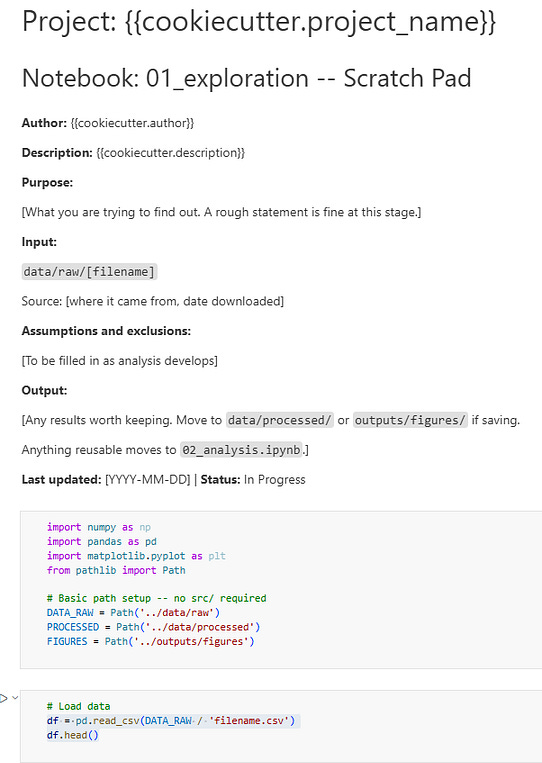
If you already have starter templates, keep using them. A shared template_explore.ipynb and template_record.ipynb make it easier to begin in a consistent way without having to think about setup every time.
shared/
    templates/
        template_explore.ipynb
        template_record.ipynb
The explore template can stay minimal. The record template should be a bit more structured, with room for assumptions, exclusions, outputs, and notes.
This isn’t about forcing every notebook to look pretty. It’s about reducing friction and making notebooks easier to read later.
I have some prepopulated notebook templates in my cookiecutter template on github: andymcdgeo/jupyter_notebook_template
How This Fits With src/, config.py, and the Wider Structure
It’s worth being clear that this article is not arguing for a notebook-only system.
The earlier project structure still does the heavy lifting around code, paths, and outputs. If you’re copying functions between notebooks, they should still move into src/. If paths are fragile, fix them in config.py. If outputs are scattered, standardise where they are written.
If code is shared between multiple projects, then it is time to consider an alternative, such as a personal python library that you develop alongside your projects.
This article is solving a different layer of the same problem by making the notebook collection inside each project more legible.
What This Does Not Solve
This system doesn’t replace version control, and it doesn’t solve collaborative editing. Shared notebook development still has all the usual Git awkwardness.
It also doesn’t stop you creating too many notebooks in the first place. If every small variation becomes a new file, the collection will still grow faster than it should.
And yes, it needs a bit of maintenance. You have to rename notebooks when they move from exploration to record. You have to keep the README current enough to stay useful. You have to add finished notebooks to the index.
But those are small jobs. The alternative is usually much more annoying later.
Closing Thoughts
The test of a notebook system isn’t whether it looks organised on a good day. It’s whether it still makes sense when you come back to to it months later or under pressure.
That is where most notebook folders start to fail. Not because the work was bad, but because the structure around it was too loose to hold its shape over time.
The project structure from the previous article solves part of that by giving each project a consistent layout. This layer builds on it by making the notebooks inside that structure easier to read, search, and trust.
If a notebook collection is small, you can get away with memory and loose naming. Once it grows, that stops being enough.
A little structure helps things go a long way.
Good organisation becomes more valuable when individual notebooks are also worth organising. The 6 Jupyter Notebook Habits article covers the practices that make notebooks traceable, rerunnable, and readable — which is what makes the system above worth building around them.