Jupyter notebooks are a great tool for exploration. They can help you move quickly, test ideas, tweak parameters, and follow a line of thought without too much friction.
That flexibility is part of what makes them so useful, but it’s also one of the reasons they are easy to break.
A notebook can look finished, run perfectly in your current session, and still fail the moment someone else opens it from a clean start. Sometimes that someone else is you, six months later, trying to work out what past-you actually did.
Here are three simple habits I have tried to stick to over the years. They won’t get in the way while you are working, and they can save a lot of frustration later.
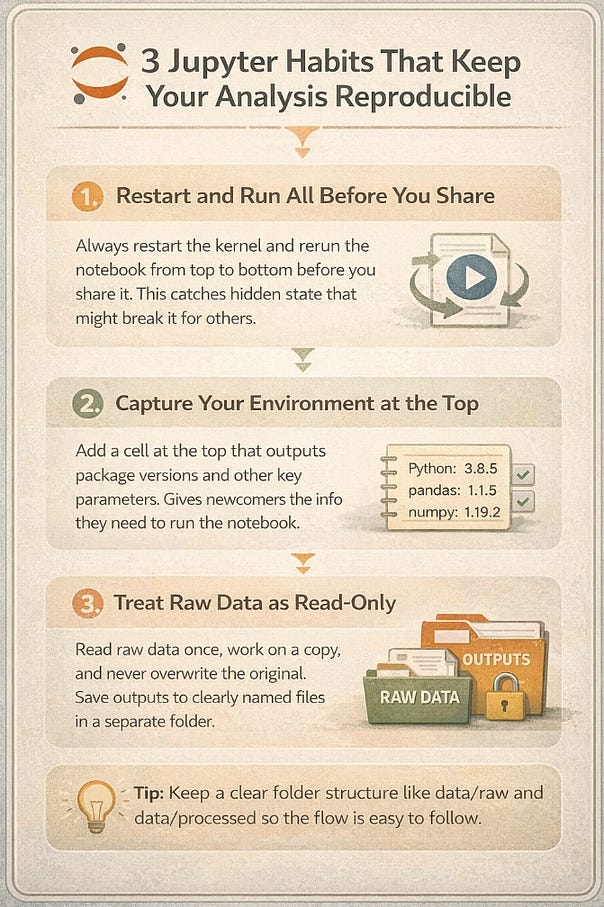
1. Restart and Run All Before You Share
As you start working in a notebook the history of how the cells were run starts to build up.
These cells can end up getting run out of order, variables get redefined further down the page, and objects can stick around in memory. If you were to restart that notebook, you may find that it falls over and the results start to look different. This is a particular problem if someone is looking at your notebook for the first time.
To resolve this issue, and before you share a notebook, it is best to restart the kernel and run the whole thing from top to bottom.
If it breaks, that will tell you something useful. It usually means the notebook depends on hidden state that only existed in your session and not in the notebook itself.
If you run the notebook from a fresh start and it runs cleanly all the way to the end, then it is a good
2. Capture Your Environment at the Top
A notebook is often used to record an analysis, but it usually does a poor job of capturing the environment that made that analysis work. This is something I am often guilty of, but I have started to implement the following habit.
When you run your notebook it may run perfectly on your machine which is setup with one version of pandas or numpy, but when it runs on someone elses machine, it may behave differently. In others, there is a chance it will run just well enough to be misleading, especially if key functionality and behaviour in the libraries has changed.
The habit is to include a cell near the top of every notebook that captures the key environmental information: package versions, file paths, and any parameters that control the analysis. This doesn’t need to be sophisticated, and in fact sometimes keeping it simple is often to your advantage.
import sys
import pandas as pd
import numpy as np
import lasio

# Print environment info
print(f”Python:  {sys.version}”)
print(f”pandas:  {pd.__version__}”)
print(f”numpy:   {np.__version__}”)
print(f”lasio:   {lasio.__version__}”)

# Key parameters, change these here, not buried in the notebook
WELL_NAME = “15/9-F-11A”
FORMATION_TOP = 2100.0   # mMD
FORMATION_BASE = 2350.0  # mMD
GR_CUTOFF = 75.0         # API units
The parameters block is often the most useful part. It gives you a single place to see what the notebook assumes, and it makes rerunning the analysis with different inputs much easier.
It doesn’t need to be elaborate. The point isn’t to build a full configuration system inside the notebook, but rather to avoid the user making assumptions.
One small caveat though, is this only captures the environment at the moment the cell is run. If you reopen the notebook later and run it again after upgrading packages, the printed versions will update as well. That makes this useful for visibility, but not as a historical record.
If you need a more fixed record of the environment used at the time of the analysis, it is better to also save that information outside the notebook, for example in a requirements.txt, an environment file, or project documentation.
3. Treat Raw Data as Read-Only
This is the habit that can save the most trouble later.
It’s very easy in a notebook to load a dataset, start cleaning or filtering it, and then keep modifying that same object across multiple cells. After a while, it becomes hard to tell what has changed, what the original looked like, or whether a step has already been applied once before.
That becomes a problem the moment something goes wrong. Maybe a filter was too aggressive. Maybe a unit conversion was applied when it should not have been. Maybe a column was overwritten halfway through the notebook and nobody noticed. Once the raw data has been mixed up with the working copy, getting back to a clean starting point usually means starting again.
I find this especially painful when preparing data for machine learning modelling, where multiple transforms can build up over time and it becomes much harder to see exactly what has been done to the dataset.
A much safer habit is to treat raw data as read-only. Load it once, leave it alone, and do your work on a copy. Then save outputs to clearly named files in a separate location.
import pandas as pd
from pathlib import Path

# Paths -- keep these at the top
DATA_DIR = Path(”data/raw”)
OUTPUT_DIR = Path(”data/processed”)
OUTPUT_DIR.mkdir(parents=True, exist_ok=True)

# Load raw data, do this once, never modify raw_df
raw_df = pd.read_csv(DATA_DIR / “well_logs_15_9_F11A.csv”)
print(f”Loaded {len(raw_df)} rows from raw data”)
print(raw_df.dtypes)

# Work on a copy
df = raw_df.copy()

# ... your processing steps here ...
# Save outputs with descriptive names
output_path = OUTPUT_DIR / “well_logs_15_9_F11A_processed.csv”
df.to_csv(output_path, index=False)
print(f”Saved processed data to {output_path}”)
Using Path objects also makes the notebook easier to move between directories or machines. Hard-coded absolute paths buried halfway through a notebook are one of the easiest ways to make it fragile.
This habit becomes even more useful when it is paired with a clear folder structure such as data/raw, data/processed, and outputs/figures. That way the flow of data is easy to follow, and someone opening the project for the first time can work out what is going on without having to inspect every cell.
See the following for a full project structure that I have started to implement to keep things organised: The Project Structure That Makes Good Jupyter Notebook Habits Automatic
You also don’t need to force all of this into a single cell.
In practice, it is often clearer to split it into a few small setup cells, for example one for imports, one for paths and configuration, and one for loading the raw data.
The Common Thread
None of these habits require significant effort to implement, but the hard part is doing them consistently. Even I still forget from time to time!
Reproducibility is not really about being tidy for the sake of it. It is about being able to rely on your own analysis when it matters. That might be when a result gets questioned, when you need to update the work months later, or when someone else has to pick it up and make sense of it.
These three habits will not make a notebook perfect, but they will make it much easier to rerun, trust, and hand over.